
🚨 Study Not Performed? Here’s the Quick Fix
Posted on November 12, 2026
Ever get interrupted by the “Study must be Performed” pop-up in EMSOW?
But what if we told you it only takes 30 seconds to fix? 🤭 Let’s walk through it!
🔧 Here’s how to switch a study to Performed:
1️⃣ Click Processing
2️⃣ Select the desired date and service
3️⃣ Click Move > Performed
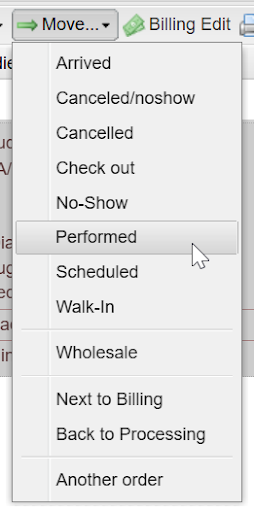
✅ That’s it—problem solved. You’re now free to continue your workflow without delays.
🎥 Need help?
A short video tutorial is waiting for you. Watch it now!
🔐 EMSOW is a cloud-based, HIPAA-compliant platform for managing radiology workflows—from image acquisition and reporting to billing and revenue cycle management.