
Error – patient_mrn (NE)
Posted on August 22, 2025
Dear healthcare provider!
The productivity of U.S. radiologists has increased by 70% due to Picture Archiving and Communication Systems (PACS), which speed up image reading, according to a study by Mythreyi Bhargavan, Ph.D. While their annual procedures increased slightly, their overall workload grew significantly. Using survey and Medicare data, the study found that imaging is becoming more common, and radiologists’ workloads continue to grow despite more imaging being done by non-radiologists *.
With EMSOW you can streamline your workflow using our PACS system.
In this edition, we address the common PACS Storage error: “The Patients directory already contains an entity with the following attributes: (patient_mrn).” Here’s a step-by-step guide to help you locate services and manage this error effectively.
1. Go to PACS → PACS Storage and search for images by last/first name or date of birth. Check their status:
- If Attached, click the accession number in the Attached to column to find the service.
- If Detached, click Reprocess as new
2. If you get an error about a duplicate patient MRN, follow these steps:
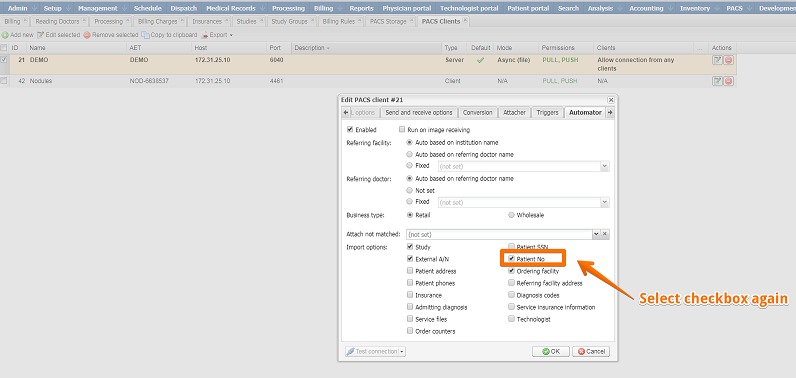
- Go to Setup → PACS → PACS Clients.
- Select the default PACS Client and edit it.
- In the Automator tab, disable the checkbox Patient No under Import options.
- Reprocess the images as new.
- Once the images are attached, re-enable the Patient No checkbox in the PACS client settings.
Click the necessary referring facility in the Referring Facilities module, and you will see who created the facility and when on the Details panel:
Explore Further