How to Upload a Document in EMSOW
Posted on October 3, 2025
This week’s EMSOW for the PROs tip is all about uploading documents in the Technologist Portal— because we believe managing exams should be as easy.
How to Upload a Document (in 6 Easy Steps!)
- Limited customization → If your workflow is unique, you’ll likely hit roadblocks.
- In the Technologist Portal, select the Study you need to attach the document to.
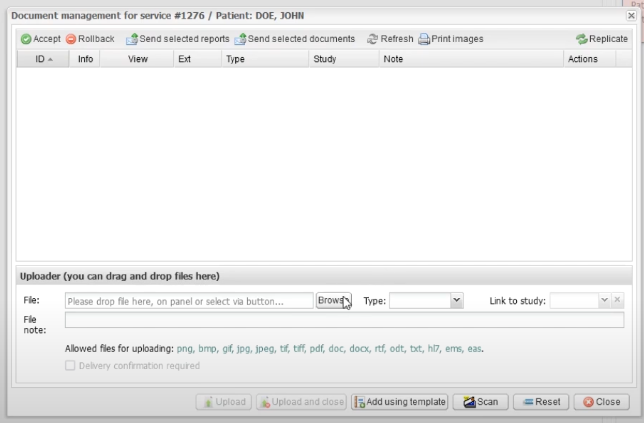
- Click «Documents»
- Hit «Browse» and pick your file. (We recommend NOT uploading your holiday wish list. 😉)
- Select the Document Type
- Click "Upload and Close"—and that’s it!
Your document is now securely stored and ready whenever you need it—quick, compliant, and stress-free. Plus, EMSOW’s HIPAA-compliant cloud storage keeps it safe.
You can always watch our wonderful video tutorial from EMSOW Academy.