Easily Process Studies with EMSOW’s “Reprocess Step-by-Step”
Posted on February 19, 2026
Today, let’s explore the Technology Portal and how it simplifies manual study processing with EMSOW’s «Reprocess Step-by-Step» feature. This intuitive tool allows users to manually create studies based on patient demographics from the DICOM study.
How it works:
1️⃣ Click Portals> Technologist portal
2️⃣ Select the desired data
3️⃣ Select detached (red) study
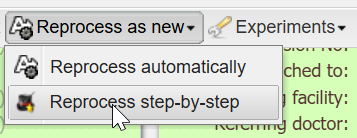
4️⃣ Click Reprocess as new > Reprocess step-by-step
5️⃣ Verify patient demographics
6️⃣ Verify Service data such as DOS, Referring facility, and Referring doctor and type of study.
7️⃣ Click Ok — and you’re done!
Need extra help?
Check out our EMSOW Academy video tutorial for a step-by-step visual guide!